
Reporting
OpenEduCat provides two pivot reports that allow you to analyse the attendance of the institute from any angle.
Attendance Sheet Analysis
Go to Class Attendances ‣ Reporting ‣ Attendance Sheet Analysis.
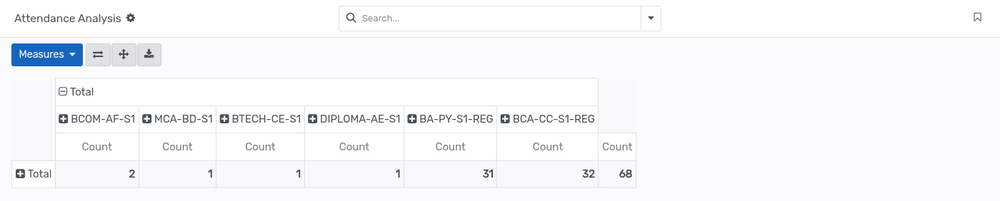
The attendance sheets are summarised so that you can compare the number of sheets, and the present and absent totals, per register, course, batch or date.
Click on the
+icon of a row or of a column header to expand the analysis by another criterion.Use the
Measuresbutton to add or remove the values that are summarised, and the search bar to restrict the analysis to a period or to a register.The buttons on the right of the
Measuresbutton allow you to flip the axes, to expand all the groups, and to download the report as a spreadsheet.
Attendance Line Analysis
Go to Class Attendances ‣ Reporting ‣ Attendance Line Analysis.
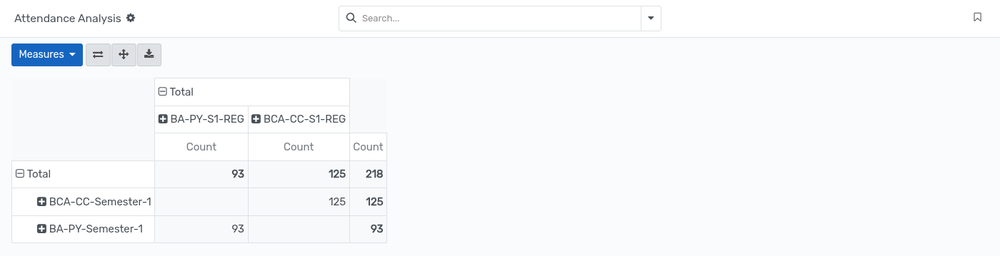
The individual attendance records are summarised, which allows you to follow the attendance of a particular student, course or batch over time.
The analysis can be expanded by student, by attendance sheet, by date or by any other field, exactly like the Attendance Sheet Analysis.
ملاحظة
Both reports are available to the users who have the attendance access rights, and only show the records of the companies that are allowed for their account.
Attendance on the Batch Dashboard
The batch dashboard, available from SIS ‣ Dashboard ‣ Batch, also
gives a direct access to the attendance of a batch. Open the ⋮ menu
of a batch card :-
Under Views, click on Attendance Sheet to open the attendance sheets of that batch.
Under New, click on Attendance Sheet to create a new attendance sheet.
Attendance on the Academic Plan
When the Academic Plan feature is used, an Attendance Sheet button is displayed on the top of the academic plan form. It shows how many attendance sheets of that plan have already been started, and opens them when it is clicked.
Attendance in Student Progression
The enterprise module integrates attendance tracking into student progression management (op.student.progression):
Backend Progression Form: Opens an Attendance tab containing the Get Attendance wizard button. Clicking this button automatically aggregates the student's attendance records, computes the Total Attendance count, and lists individual line items.
Progression PDF Report: The generated Student Progression report automatically includes an Attendance table detailing date, course, batch, status (Present/Absent), and remarks.
Portal Integration: Students and parents can access a dedicated Attendance tab within the Student Progression portal page to monitor attendance history.
Excel (XLSX) Attendance Reports
OpenEduCat includes a dedicated Excel reporting engine (openeducat_attendance_report_xlsx) that enables administrators and faculty to export high-density attendance statistics directly into Microsoft Excel (.xlsx) format.

Exporting Attendance Excel Reports
Go to .
Select an existing attendance register from the Kanban or List view.
Click the Action / Print menu icon (gear icon) in the top control panel.
Select one of the available XLSX reports: - Print Attendance Report: Generates a detailed spreadsheet with attendance marked (
1for Present,0for Absent) per attendance sheet column, along with total lectures taken, total lectures attended, and overall attendance percentage per student. - Print Attendance Report By Week: Generates a weekly aggregated spreadsheet grouping attendance records week by week, showing weekly percentages and cumulative overall attendance percentages.
Technical & Administrative Configuration
Dependencies: Requires Python packages
xlsxwriterandxlrd.Report Action Engine: Registers the
xlsxreport type inir.actions.report(report_type="xlsx").Abstract XLSX Model: Developers can inherit from
report.openeducat_attendance_report_xlsx.abstractto build custom Excel reports across OpenEduCat modules.Client-Side Download: Integrated with Odoo's Web client via an OWL action handler (
action_manager_report.js), ensuring instant file downloads without page reloads.
ملاحظة
For detailed matrix structures, weekly breakdown explanations, and custom developer instructions, see Attendance Excel (XLSX) Reports.