
خطوط ورقة العلامات
يتم الاحتفاظ بسجل علامات جميع الطلاب في OpenEduCat. يقوم بتخزين العلامات والنتائج جنبا إلى جنب مع علامات المادة الحكيمة للطلاب.
You can go to the . Click on New button to create new Marksheet Line.
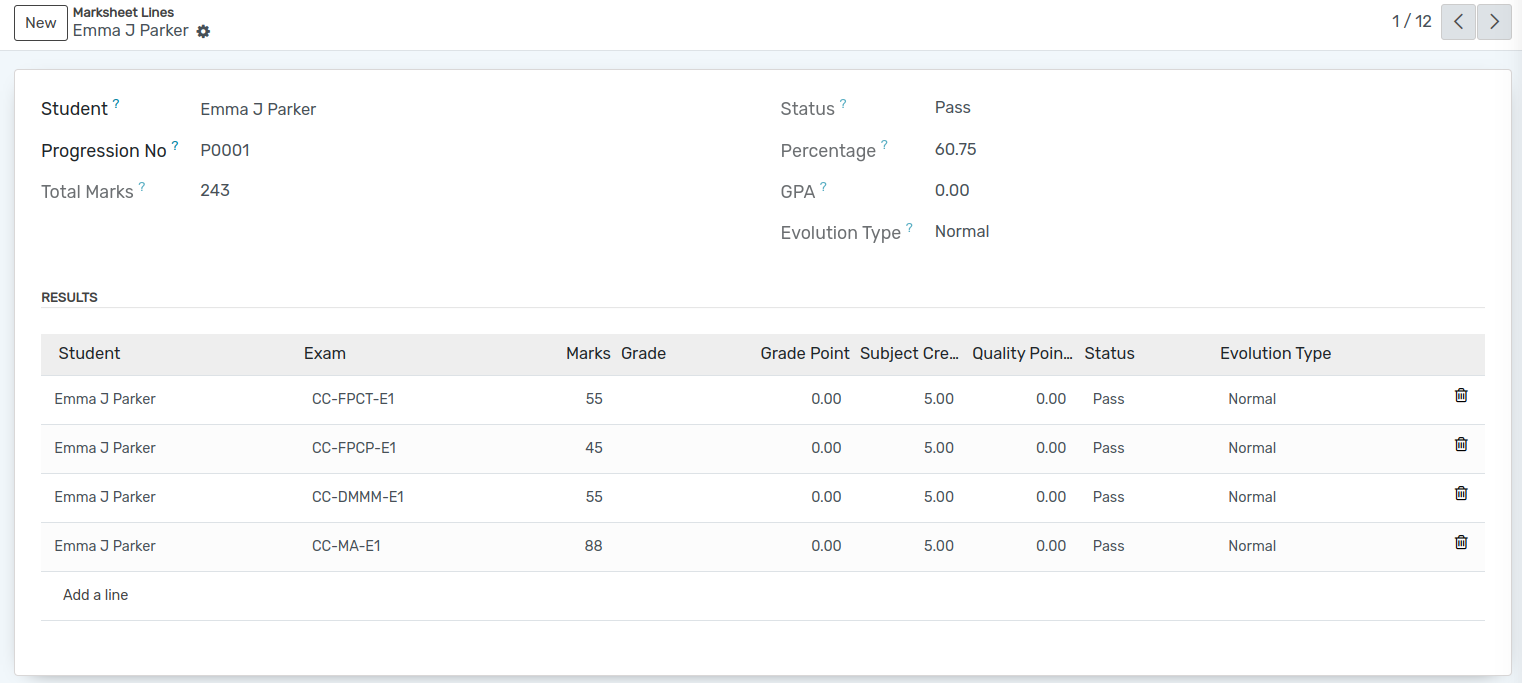
تفاصيل خطوط Marksheet
Student :- Select the name of student in Student field from list of available students.
Progression No :- Displays the associated Progression number of the student.
Total Marks :- Sum of marks obtained across all subjects.
Percentage :- Overall percentage scored across the exam session.
Status :- Overall result status (Pass or Fail).
GPA :- Grade Point Average automatically calculated using the formula:
\[\text{GPA} = \frac{\text{Total Quality Points}}{\text{Total Subject Credits}}\]Evolution Type :- Evaluation method (Normal, etc.).
Results Table :- Itemized subject-wise result breakdown: * Exam :- Individual exam name and code. * Marks :- Marks secured in the subject. * Grade :- Letter grade assigned (e.g., A, B, C, D-). * Grade Point :- Numeric grade point corresponding to the grade. * Subject Credit :- Credit hours configured on the subject. * Quality Points :- Subject points calculated as \(\text{Grade Point} \times \text{Subject Credit}\). * Status :- Subject-level passing status.