
Scholarship
OpenEduCat allows educational institutions to manage, evaluate, and track student scholarship grants. Each scholarship record tracks the recipient student, course, batch, grant type, grant amount, financing sponsor, and current evaluation stage. Administrators can also generate customer invoices directly for sponsors from the scholarship form.
Go to .

Scholarships are initially displayed in a Kanban view where each column represents a scholarship stage. Each card displays the reference number, student name, scholarship type, course, batch, and grant amount. Drag and drop cards between stage columns to transition scholarships across stages.
Use the view switcher at the top right to toggle between Kanban view and List view.

Create a Scholarship
Click on New to record a new scholarship application.
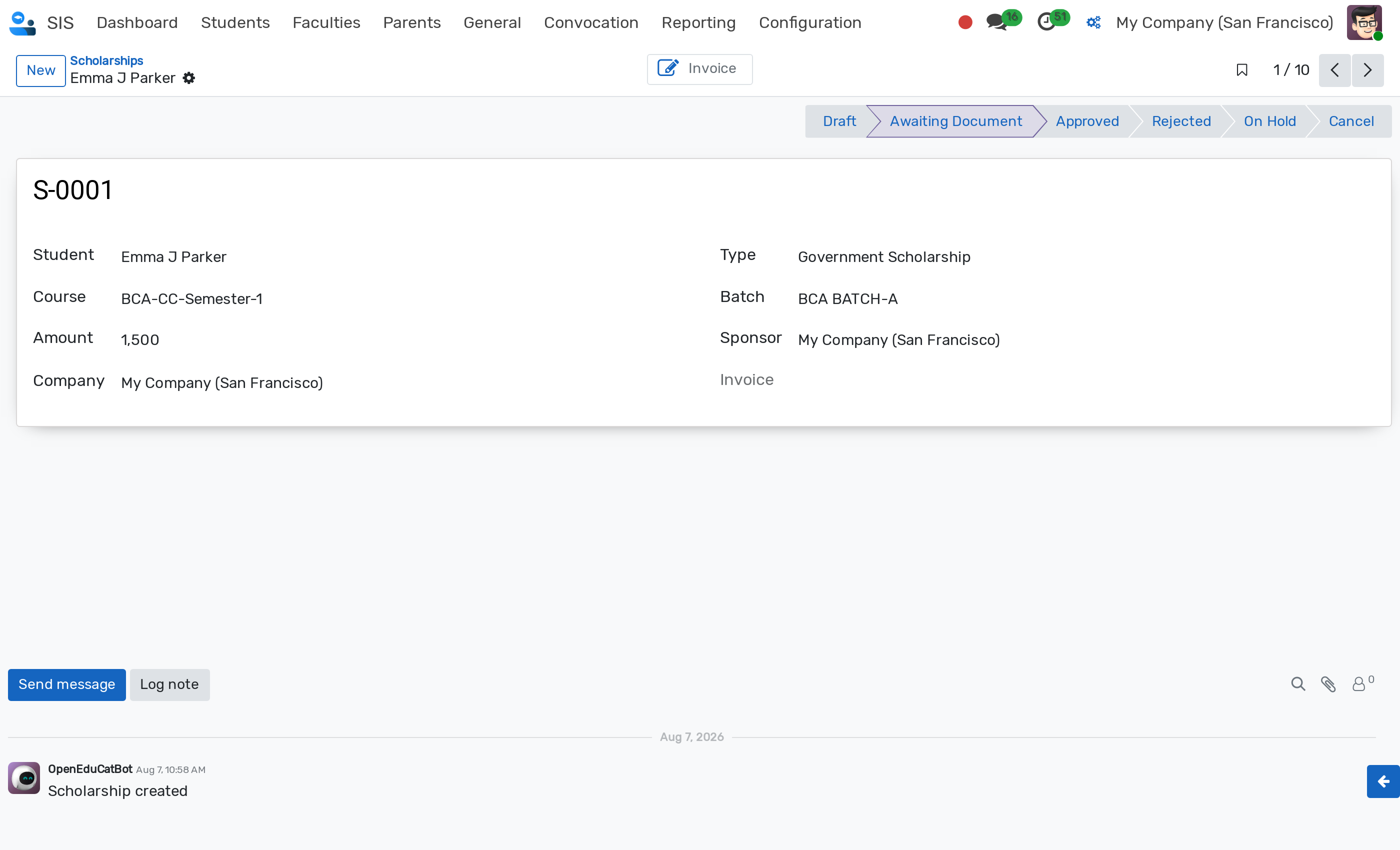
Details of Scholarship Form
Name :- Unique reference sequence generated automatically with the prefix
S-(e.g.S-0001). Read-only field.Student :- Select the student receiving the scholarship. Mandatory field.
Course :- Select the enrolled course for which the scholarship applies. The dropdown dynamically displays only the running courses for the selected student.
Amount :- Monetary value of the scholarship grant. The amount must be strictly greater than zero (> 0).
Type :- Select the scholarship classification type (configured under ). Mandatory field.
Batch :- Select the student batch. The choices are filtered based on the selected course.
Sponsor :- Select the partner/contact financing the scholarship. Used as the customer on the sponsor invoice.
Invoice :- Displays the generated customer invoice (
account.move) associated with the scholarship. Read-only field.Company :- Company to which the scholarship belongs (multi-company support).
Note
All changes to Name, Amount, and evaluation Stage are logged in the chatter timeline for auditing and historical tracking.
Scholarship Stages
The progress of a scholarship is tracked through an interactive status bar at the top right of the form. Click directly on a stage in the status bar to advance or update the stage.
Default demonstration stages include Draft, Awaiting Document, Approved, Rejected, On Hold, and Cancel. New scholarships start in the Draft stage.
Custom stages can be added or modified under .
Generate the Sponsor Invoice
Once a scholarship is approved, the grant amount can be billed directly to the sponsor:
Click on the Invoice stat button at the top of the scholarship form.
OpenEduCat automatically creates a draft customer invoice for the specified Sponsor, setting the invoice line amount to the scholarship Amount and student name.
The created invoice is automatically linked in the Invoice field. Clicking the Invoice stat button again reopens the existing invoice.
Note
The Invoice stat button is restricted to users with Scholarship / Manager permissions.
The created invoice remains in Draft state, allowing accounting managers to review taxes, products, and accounts before posting.
Search and Filters
Use the search bar on the Scholarships screen to locate specific records:
Search by scholarship reference number (
S-XXXX) or student name.Archived :- Filter displaying archived/inactive scholarship records.
Group By :- Categorize records by Name, Student, or Type.
Archive a Scholarship
To preserve historical records without keeping inactive grants in default views:
Click the Action gear icon (⚙) and select Archive. An Archived ribbon will appear on the record.
Archived records can be viewed anytime by applying the Archived filter.
Access Rights
Security access for scholarships is managed via two security groups:
Scholarship / User (
group_op_scholarship_user) :- Can view and update scholarship applications. Included in the Faculty Member role.Scholarship / Manager (
group_op_scholarship_manager) :- Full administrative control to create, edit, delete, generate sponsor invoices, and configure scholarship types and stages. Included in the Head Admin role.
Note
Multi-company security rules ensure users only view scholarship records belonging to their authorized companies.