
Configure Route Register
A Route Register is the core scheduling record that manages the enrollment of students and faculty on a specific route for a defined period. It links a route to a billing plan, tracks enrolled passengers via Transportation Agreements, and controls whether new registrations are open.
Go to .
The Route Register opens in a Kanban view by default, displaying each register as a card with its name, route, cost, date range, state ribbon, and an Agreements button showing the count of linked agreements.
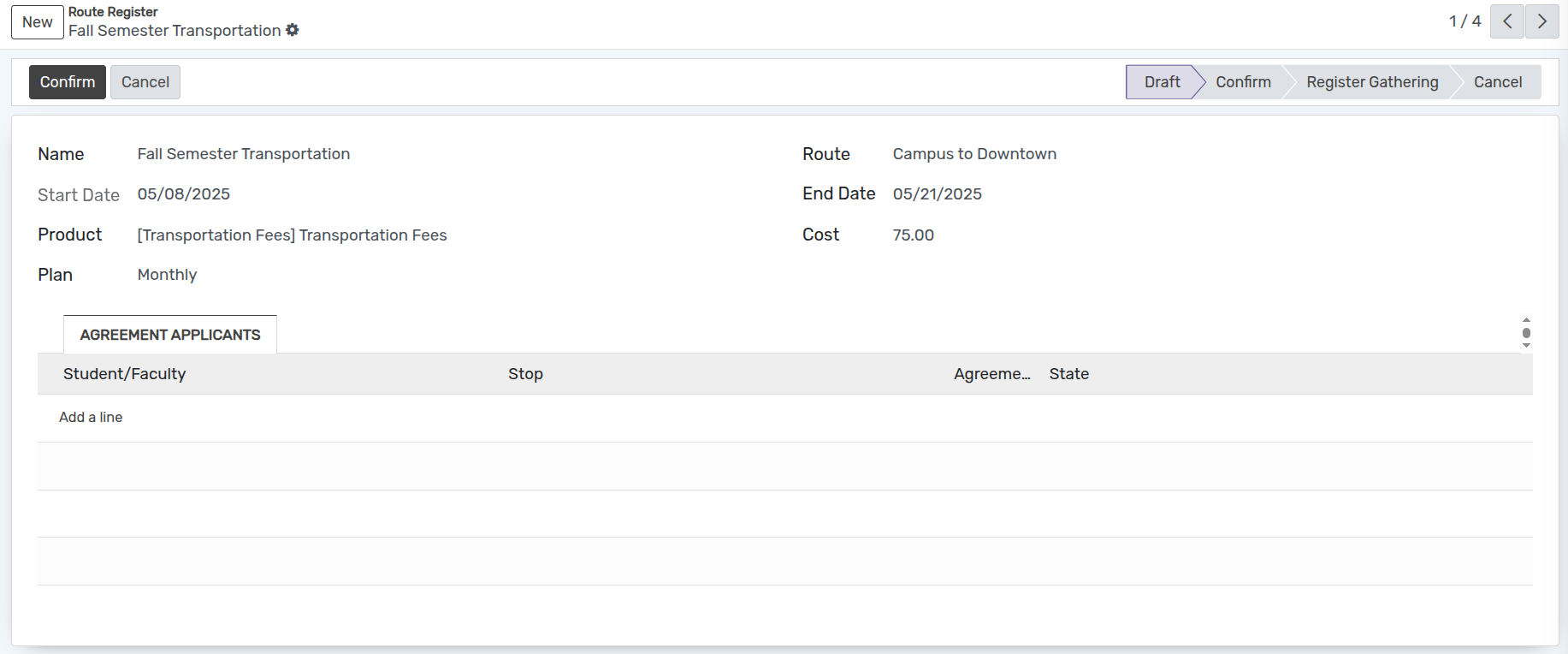
Click New or switch to list view and click New to create a new route register.
Details of Route Register Form
Name :- Set the name of the route register. Displayed throughout the system.
Route :- Select the route from the dropdown for which you want to create the register.
Start Date :- The start date of the register (auto-filled with today’s date, read-only after creation).
End Date :- Select the end date of the register.
Product :- Auto-filled based on the selected route’s product.
Cost :- Auto-filled based on the selected route’s cost.
Plan :- Select the billing plan for this route register. Determines how often invoices are generated for enrolled passengers.
Agreement Applicants Tab
The Agreement Applicants tab inside the Route Register form lists all Transportation Agreements linked to this register, showing the student/faculty name, stop, agreement date, and state.
Workflow of Route Register
Draft
When a new Route Register is saved, it starts in the Draft state. In this state only the Confirm button and the Cancel button are available.
Confirm
Click Confirm to advance the register to the Confirm state. Once confirmed, click Start Registration to open the register for passenger enrolment.
Start Registration (Register Gathering)
Click Start Registration to set the state to Register Gathering. Only registers in this state can be selected when creating new Transportation Agreements.
Cancel
The Cancel button is available in Draft, Confirm, and Register Gathering states. A cancelled register can be reset with Set to Draft.