
Desk Configuration
Desk Types
To Configure Desk Types, follow the steps below.
Go to Desk ‣ Configuration ‣ Desk Type.
Click on New to create a new desk type.
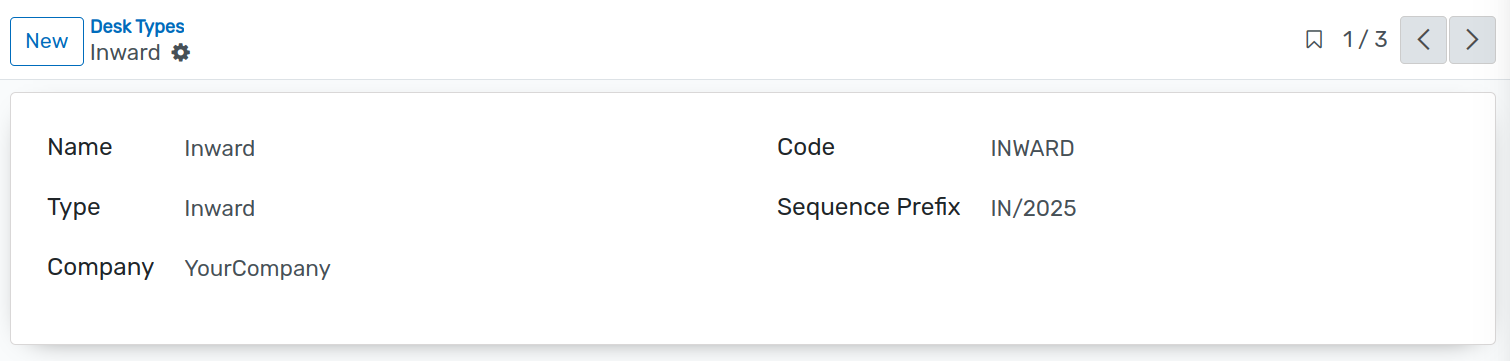
Details of Desk Types
Name :- Enter the name of the desk.
Code :- Provide a unique code for the desk.
Type :- Select the type of desk: Inward, Outward, or Internal.
Sequence Prefix :- Specify the prefix for automatic sequence generation. When a type is selected, the system will generate desk sequences using this prefix.
Company :- Assign the desk type to the appropriate company.
Dispatch Mode
Here, you can add and manage multiple Dispatch Modes as per requirements.
To Configure Dispatch Modes, follow the steps below.
Go to Desk ‣Configuration ‣ Dispatch Modes.
Click on New to create a new Dispatch Mode.

Details of Dispatch Mode
Name :- Enter the name of the dispatch mode.
Code :- Provide a unique code for the dispatch mode.
Shipping Details :- Enable this option if the dispatch mode includes shipping details.
Document Categories
To configure Document Categories, follow the steps below.
Go to Desk ‣ Configuration ‣ Document Categories.
Click on New to create a new Document Category.

Details of Document Categories
Name :- Enter the name of the document category.
Code :- Provide a unique code for the document category.
Attachments :- Upload or view all files linked to this document category. - Multiple files can be uploaded. - All attachments related to the selected category will be displayed here.