
Terminology Configuration
Every institute uses its own vocabulary. A university speaks of Programs and Faculties, a school speaks of Grades and Teachers, and a training centre speaks of Modules and Trainers. Terminology Configuration lets you rename the core OpenEduCat terms so that the whole system speaks your institute’s language, without any customisation.
The terms you define replace the standard words everywhere they appear in the interface :- application menus, breadcrumbs, form labels, tab titles, list column headers, buttons, filters and group-by menus, dialog titles, printed reports and the website menus.
You can rename the following eight terms, each with a singular and a plural form :-
Course
Student
Faculty
Program
Subject
Batch
Company
Branch
Create a Terminology Configuration
Go to Settings ‣ OpenEduCat ‣ SIS. In the Terminology Configuration
setting, click on Configure Terminology.
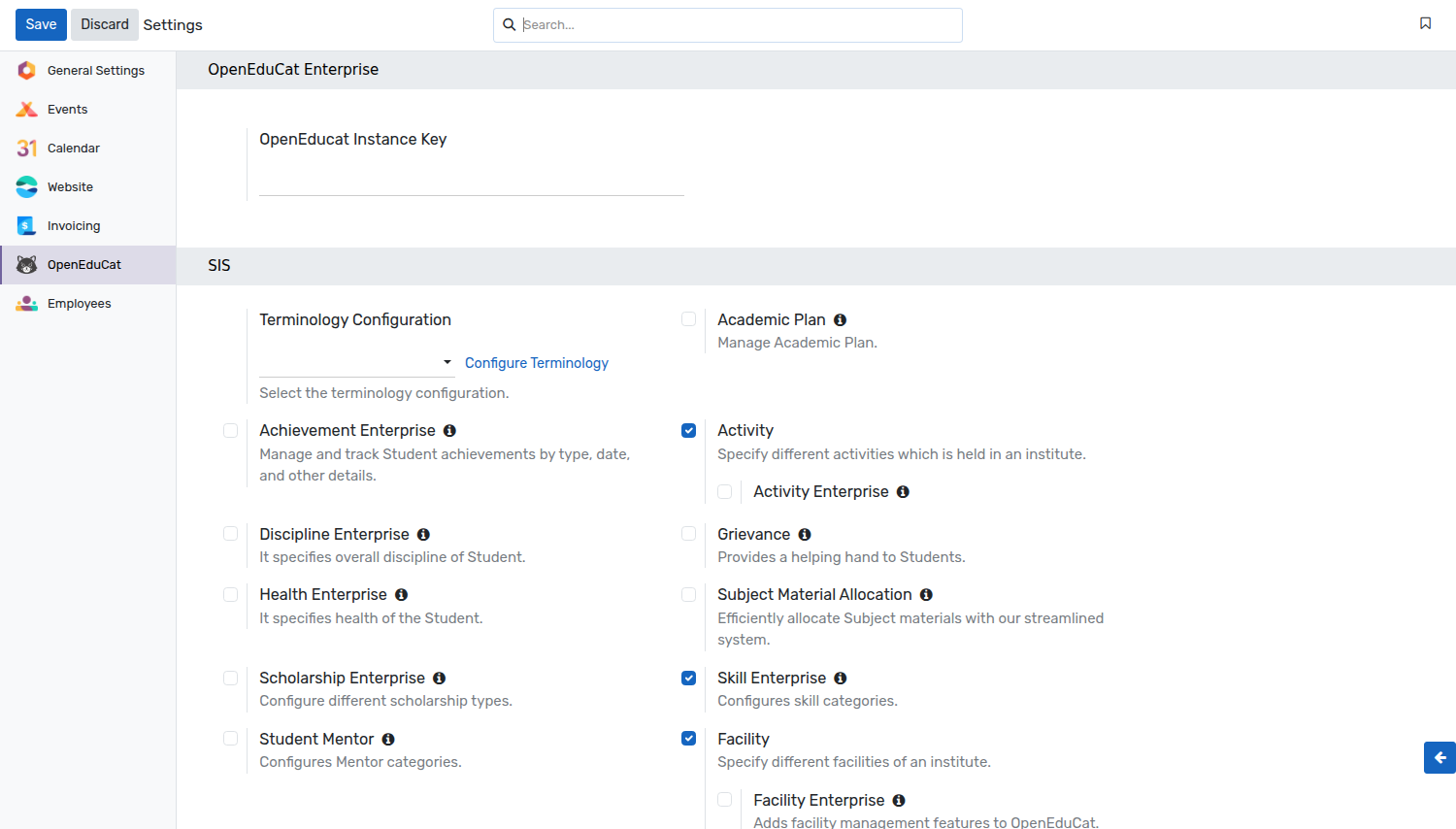
The list of terminology configurations opens. Click on New to create a new one.

The form groups the eight terms in pairs, with the singular on the left of each group and the plural below it.

Details of Terminology Configuration Form
Name :- Name of the configuration, for example
School VocabularyorCorporate Training. Required. It is only used to identify the configuration, it is not shown anywhere else in the system.Course / Courses :- Term used for a single course and for several courses.
Student / Students :- Term used for a single student and for several students.
Faculty / Faculties :- Term used for a single faculty member and for several faculty members.
Program / Programs :- Term used for a single program and for several programs.
Subject / Subjects :- Term used for a single subject and for several subjects.
Batch / Batches :- Term used for a single batch and for several batches.
Company / Companies :- Term used for a single company and for several companies.
Branch / Branches :- Term used for a single branch and for several branches.
Every term is optional and starts from its standard value, so you only need to fill in the words you actually want to change. A term that you leave blank, or that you set to the standard word itself, is simply left untouched throughout the system.
You can create as many configurations as you like, but only one can be active at a time.
Apply a Terminology Configuration
Go to Settings ‣ OpenEduCat ‣ SIS, select your configuration in the
Terminology Configuration field and click on Save.
Warning
Saving a configuration applies its terms straight away, even before it has been selected in Settings. As soon as you create or edit a configuration, its words are written to the system and everybody sees them after a refresh. Prepare your vocabulary on a test database if you do not want the institute to see the new wording immediately.
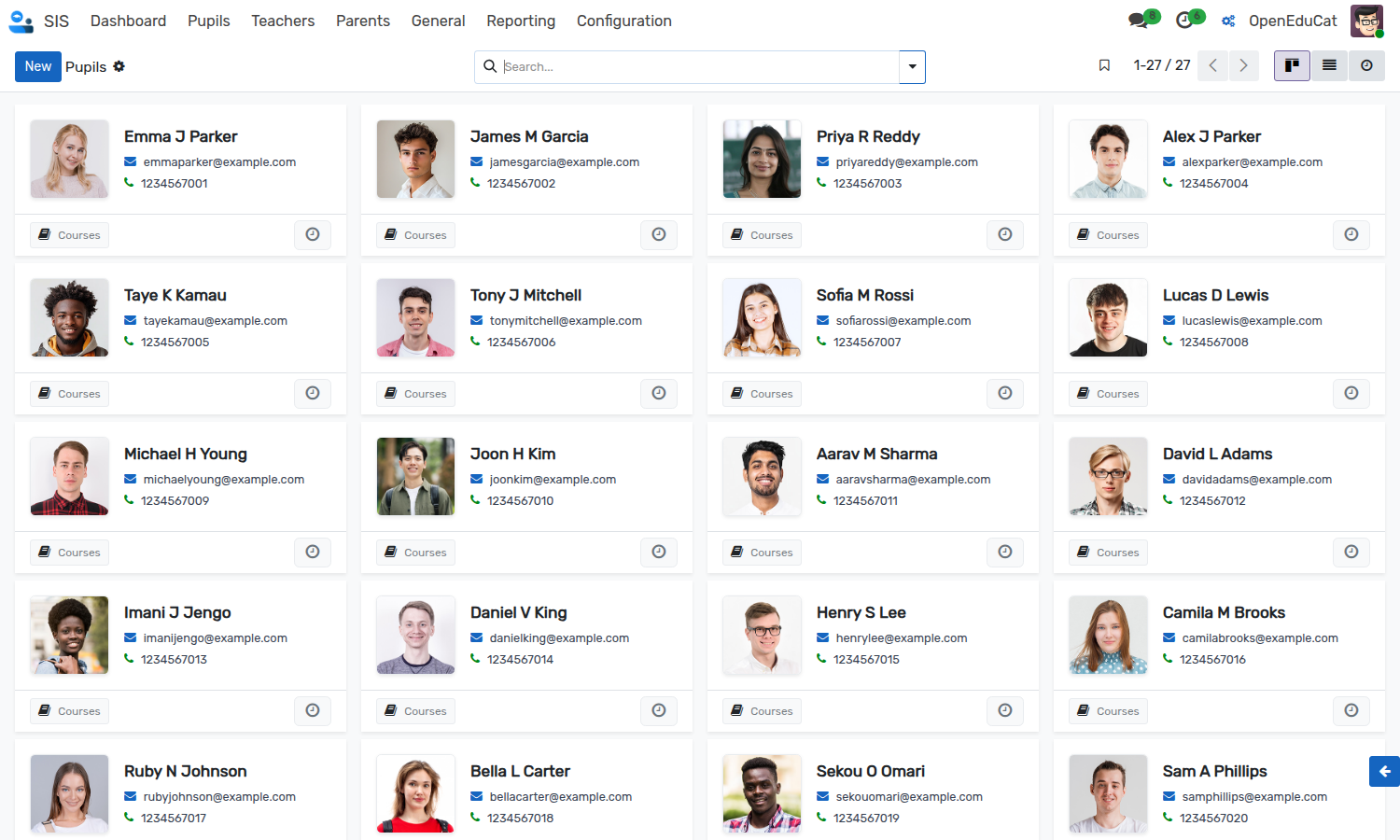
Once the terminology is active, the renamed words are used all over the interface. In the example below the Student term has become Pupil and the Faculty term has become Teacher, so the menus of the SIS application read Pupils and Teachers.
The complete workflow is :-
Go to Settings ‣ OpenEduCat ‣ SIS.
Click on
Configure Terminologyand create a configuration with your terms.Go back to Settings ‣ OpenEduCat ‣ SIS.
Select the configuration in the Terminology Configuration field.
Click on
Save.Refresh the browser to reload the menus with the new terms.
Note
The application menus are loaded once when the interface starts, so the renamed menus only appear after the page has been refreshed.
Change or Remove the Terminology
To switch to a different vocabulary, select another configuration in the Terminology Configuration field and save.
To go back to the standard OpenEduCat vocabulary, clear the Terminology Configuration field and save. Every term is reset to its built-in default (Course, Student, Faculty, Program, Subject, Batch, Company, Branch), so the previously applied words stop appearing.
Editing the terms of the configuration that is currently selected applies the new wording straight away — you do not need to re-select it in Settings.
Changes to a configuration are tracked in the chatter of the record, so you can always see who changed a term and when.
Where the Terminology Is Applied
The renamed terms are substituted both on the server and in the interface :-
Application menus, sub-menus and the app switcher.
Breadcrumbs and their tooltips.
Form labels, section titles, tab titles and button labels.
List view column headers and pivot table headers.
Kanban cards and statistic (smart) buttons.
Selection and radio button options, and field placeholders.
Dialog titles.
The Filters and Group By menus, and the facet pills shown in the search bar. Saved Favorites are not renamed, because you name those yourself.
The
ActionandPrintmenus.Printed reports.
Chatter messages, including the names of tracked fields.
Website menus.
Only whole words are replaced, so a word such as Programming is never affected by a change to the Program term. Both the capitalised and the lower-case spelling of each term are replaced, and the replacement is used exactly as you typed it.
In text rendered by the server, the words Teacher and Teachers are also treated as the Faculty term.
Permissions
The Settings page of OpenEduCat is reserved for administrators, so in practice only an administrator can create a terminology configuration or choose which one is active. Terminology configurations cannot be deleted from the interface.
The terminology itself applies to everybody. Once a configuration is active, every user of the system — back office, faculty, student and parent portal, and the website — sees the new wording.
Dependencies
Terminology Configuration is part of the OpenEduCat Core Enterprise module. No other module has to be installed.
Technical Behaviour
This section is only useful for administrators and developers.
The terms are stored as system parameters (openeducat.course_label,
openeducat.student_label_plural, and so on) and are refreshed whenever a
configuration is saved or selected. The server cache is cleared at the same time so
that menus and reports are rebuilt with the new wording.
Only the displayed text changes. Model names, field names and technical identifiers are untouched, so renaming a term never affects existing data, imports, exports or integrations, and you can change your terminology as often as you like without any risk to your records.
The Terminology Configuration form itself is deliberately excluded from the substitution, so its own labels always keep the standard wording. Otherwise the field labelled Course would rename itself as soon as you typed a new term, and the form would become impossible to read.